
Vector v0.4.2: Pocket Privacy
Vector Mobile Optimized, Scan & Share QR Codes, Biometric Login, & More
Overview
This release focused on mobile optimization, user experience, and the day-to-day life of Communities. It is a quality-of-life build above all: nothing here changes what Vector does, but a great deal of it changes how Vector feels to use, on every platform and on mobile in particular.
v0.4.2 also introduced something new to how Vector ships. A Preview Build channel now runs alongside the official releases, for Community members who want to test earlier and dig deeper. Preview builds are downloaded from GitHub and the app shows which preview you are running, so there is never any confusion about what is in your hands. Regular users are left alone entirely: no update prompt appears until the official release is published. This is how quality open-source apps improve and become resilient, by deep battle testing and feedback from daily users.
The Short Version
- Profile QR Codes: share your profile as a Vector QR, and scan a friend's straight from the New Chat screen.
- Rich Message Composer: markdown, @mentions, and custom emojis render live as you type, with headers, underscore emphasis, and small muted subtext.
- Pinned Chats & Messages: pin chats to the top of your list, and pin the messages that matter in a channel for everyone to see.
- Biometric Unlock (Android): lock Vector behind your phone's own screen lock.
Rich Message Composer
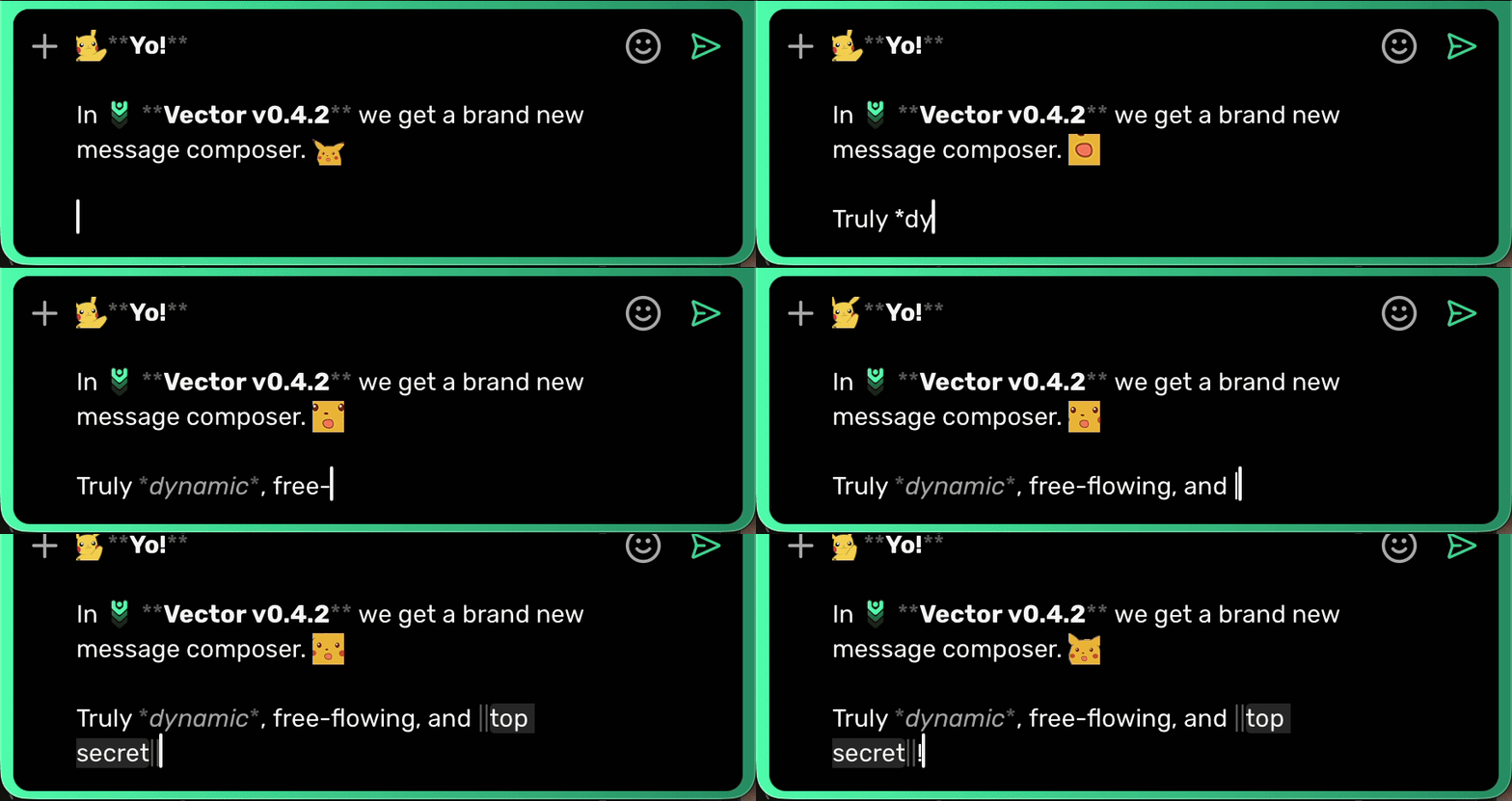
Until now the composer was a plain box that turned into something else once you hit send. You wrote **bold** and hoped. You typed an npub and trusted it would resolve. You dropped in a custom emoji and found out on the other side whether it landed. v0.4.2 closes that gap: markdown, @mentions, and custom emojis all render live in the composer, exactly as the message will read once it arrives.
The formatting grew alongside it. Underscore emphasis works for italic, bold, and both. Headers with # render as you type them. And a line starting with -# becomes small muted subtext, which turns out to be the fastest way to add an aside without derailing a thread.
Custom emojis got the fidelity pass they needed too. They survive copy and cut from the composer as their :shortcodes:, they render correctly in chat previews even when split by unicode emojis, and reply previews no longer truncate a shortcode halfway through and reveal the machinery underneath.
New Features
Profile QR Codes & Scanning
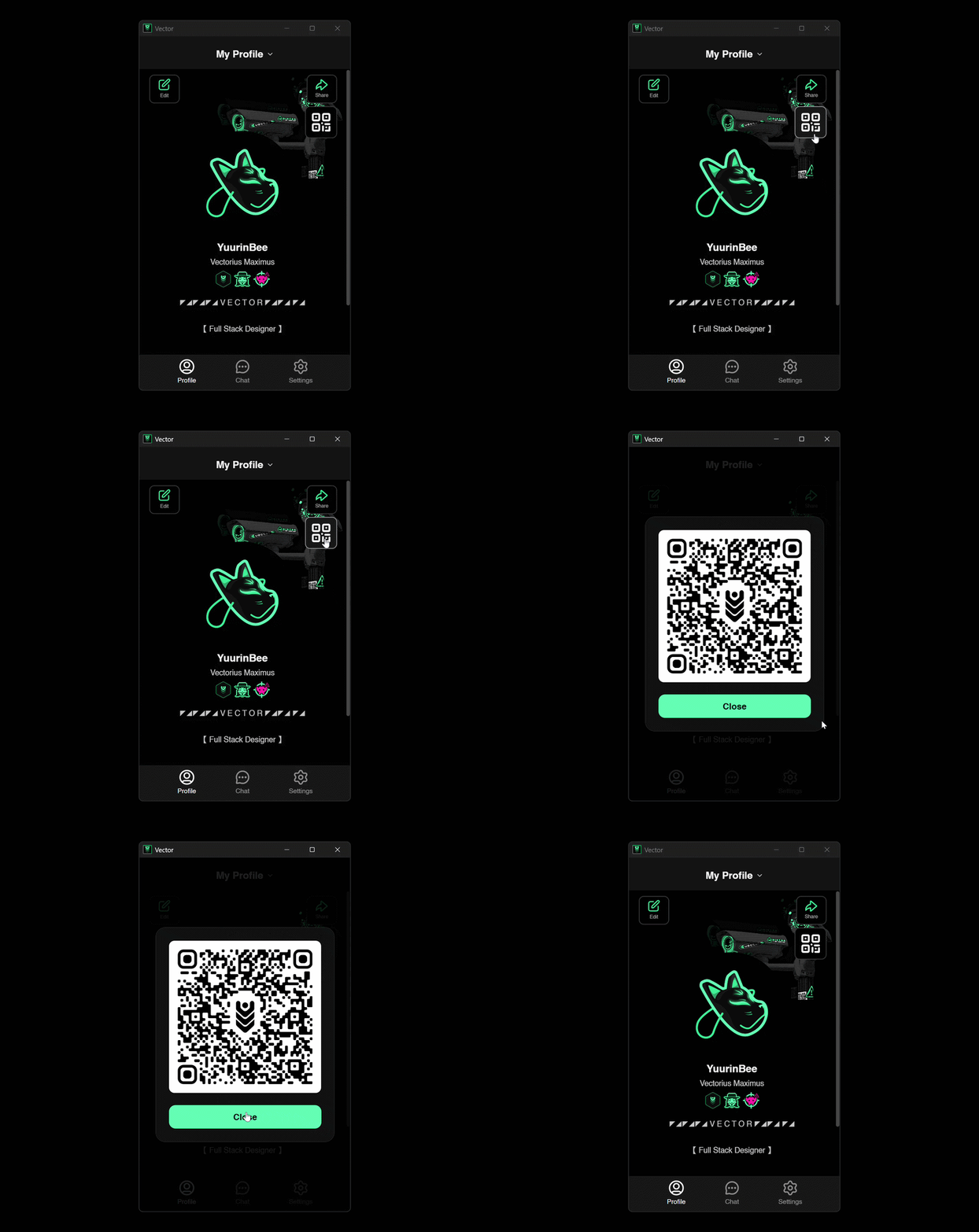
Your profile is now a card: a Vector-styled QR you can show on screen or send anywhere. Point your camera at someone else's from the New Chat screen and you land directly on their profile, ready to message. It is the simplest answer yet to the oldest problem in decentralized identity, which is getting a 63-character key from one person to another without either of them typing it.
Pinned Chats & Pinned Messages
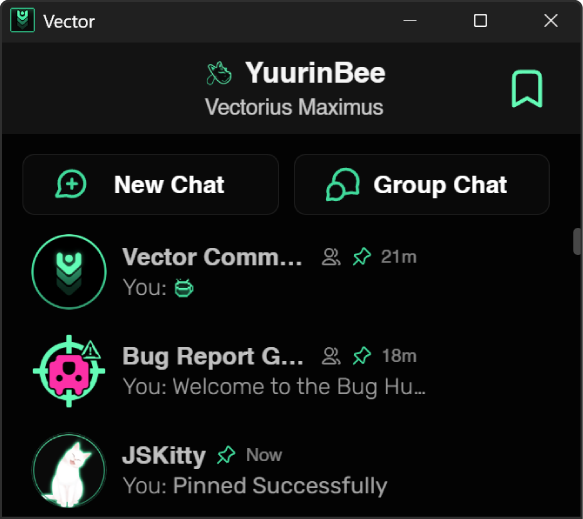
Two kinds of pinning, both arriving here. Pin your most-used chats to the top of your list and they stay there, synced across every device you own. Inside a Community channel, pin the messages that matter and everyone in the room sees them: rules, announcements, the link people keep asking for. Plain URLs inside pinned messages are clickable now, and they wear the theme color just like chat links do.
Status, Redesigned
A compact new status editor with custom emoji support and a live preview of exactly how everyone else will see it. Statuses also dropped their italic slant, which sounds like nothing until you see a wall of them lined up straight.
Synced Blocks, Mutes & Nicknames
Blocking someone on your phone and finding them waiting on your desktop was never acceptable. Your block list, mutes, and nicknames now sync between devices. Muting also broke free of DMs entirely: you can mute anyone straight from a Community, no prior DM history required, and a muted person goes properly silent everywhere at once. No notifications, no badges, in DMs and every channel alike. You still see their messages if you look. They just never ring your bell.
Mini Apps from URLs
Paste a link to an .xdc file and it opens exactly like an uploaded Mini App, multiplayer included. Every Mini App also gets its own isolated storage now, so no app can read another's data.
Android: Biometric Unlock & Self-Updating Sideloads
Protect your account with your phone's built-in lock screen, so the app is only open when you are the one holding it. Builds installed outside an app store now update themselves as well, and tapping a received .apk installs it directly.
Other Features, Fixes, & Improvements
- Per-Chat Drafts: unsent text stays with the chat you typed it in, so hopping between conversations no longer drags your half-written message along.
- Get Started: a fresh account sees a glowing Get Started pill where its first chat will live, and Viktor himself welcomes you above the navbar. Give him a hover or a tap.
- Cross-Client Attachments: files sent from other Nostr clients render as proper attachments instead of bare links.
- Tidier System Events: repeated joins, leaves, and pins collapse into a single line.
- Link Previews: sites that publish relative preview links now show their images.
- Quieter Catch-Ups: Community messages arriving in a background sync no longer ring notifications as if they had just been sent.
- Ghost Typing: the typing indicator expires from when it was actually sent, so a delayed signal can no longer haunt a channel.
- Dead Invites Bury Themselves: accepting an invite to a deleted Community tells you why and removes the invite, on every one of your devices.
- UI Polish: modals share a smooth pop-in and pop-out, app chrome is no longer text-selectable, long chat names truncate before they reach the Pins toggle, and context menu labels stop text-selecting on long-press.
Under the Hood
The most consequential work this cycle is the work you will never see directly.
Moderation at speed. Rapid-fire bans used to be able to overwrite each other. Now they queue, stack, and settle as one, which means clearing out a whole wave of spammers costs a single key rotation instead of one per person. Moderating a Community under active attack stopped being a race against your own client.
Account switching, rebuilt. The multi-account core was rewritten so that every background task stays bound to the account that started it. Switching accounts mid-sync can no longer mix anything between them, which is exactly the kind of bug you want fixed structurally rather than patched.
Communities at scale. Channels open on their newest messages instantly and page older history in as you scroll back. Member counts are accurate and stay accurate. Your joined-Communities list syncs in full no matter how many you join, and after a cross-client review pass with Armada, renames no longer bloat that list, ties resolve identically on every client, and unchanged data never touches your relays again.
Tor and safety rails. The built-in Tor core jumped four releases ahead of September's network transition, so nothing breaks when it arrives. The database now refuses to open under an older build rather than risking silent corruption.
Fixed
- Chipmunk Audio: certain m4a voice files (HE-AAC) played at double speed. They now play at the right speed and pitch, and transcription handles them too.
- Deleted Stays Deleted: deleted messages no longer resurrect after a restart when a relay ignored the deletion.
- Attachment Recovery: files in Notes and certain DMs that refused to download with "Attachment not found" work again, and affected chats heal themselves on first boot.
- Password Changes: changing your local encryption password now re-encrypts all Community data with it, so nothing goes missing afterwards.
- Migration Tail: migrated v1 Communities stop reappearing in your list, devices that missed a migration catch up on their own, and leaving a Community sticks even if a relay was down at the time.
- Reply Quotes: Community replies keep their quoted context during bulk syncs.
- Reaction Dupes: one reaction per person per emoji.
- Chat Landing: chats no longer open scrolled short of the newest message while media is still loading.
- Android File Taps: tapping a downloaded file opens it.
- Self-Updater: in-app updates on sideloaded Android builds download, verify, and install properly.
What's Next
Frontend Refactor
It is time for a deep clean, and for a pivot away from a vanilla frontend to the frontend framework called Svelte. Svelte compiles away at build time, so Vector ships lighter and the UI updates itself when state changes. Less code, fewer places for bugs to hide.
Widescreen Desktop (v0.5.0)
A true three-pane desktop shell with channels, conversation, and members side by side. v0.5.0 is where Vector stops being a phone app that happens to run on a desktop and becomes a communication hub that earns the screen it's on.
Join the Vector Community
Six preview builds went out this cycle, and every one of them came back with something worth fixing. That loop is not a formality; it is how this release was written. There is a seat in it for you.